Pocket PC Freeware .mobi
» SharpSword
Rating: 4/5
Summary: SharpSword is a tool to assist in memorizing Bible verses.
Requirements:
Windows Mobile Pocket PC 5 , 6 , 6.1
.NET Compact Framework 2.0
Arrived: Dec 24, 2008
Found under: Misc, Religion, Christian, bible, memory
Download now
Requirements:
Windows Mobile Pocket PC 5 , 6 , 6.1
.NET Compact Framework 2.0
Arrived: Dec 24, 2008
Found under: Misc, Religion, Christian, bible, memory
Download now
SharpSword is a tool to assist in memorizing Bible verses. It features the following:
* Quick, easy access to review verses
* Built-in, searchable KJV Bible
* Helpful exercises which enhance rapid learning
* Group verses under different categories
* Review a range of verses together, or split them up
* Customizable review periods
* "Skinnable" interface (change colors of controls, etc.)
* May be used with other Bible versions (with a bit of text work on your part)
* Completely Free!
New in Version 0.92
- Modified behavior of "Ignore Review Period" menu and changed it to "Show Reviewed Verses." It's much more intuitive now.
- New Feature: Context menu available from Review List through which a verse may be moved to the top of the list, or to another period. certain features. Just hold down the pen on a button to see!
- New Feature: option to use spaces instead of blanks on FITB exercise. Makes it much more challenging!
- Added new exercise: Learn Reference
- The Future window is now also accessible from the menu
- Help now accessible from the menu (instead of from the About window)
- Bug fix: Now hiding apostrophies for "Fill in the Blanks"
- Bug fix: Tapping a letter after finishing "Fill in the Blanks" with errors would crash
- Bug fix: When adding a verse, tapping "<" when no text present would crash
This program will work on Windows Mobile 5 and up. It probably won't work on Pocket PC 2003. Currently, the screen is set up for 320 x 240, not square.
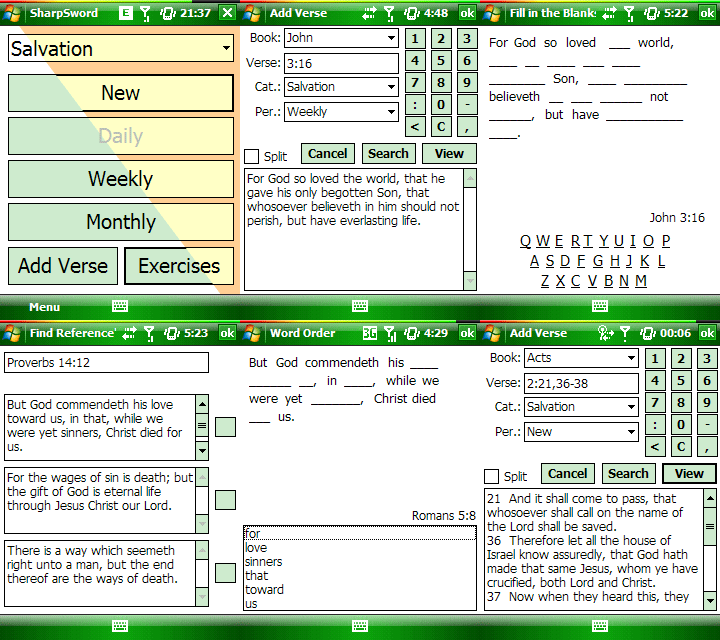
* Quick, easy access to review verses
* Built-in, searchable KJV Bible
* Helpful exercises which enhance rapid learning
* Group verses under different categories
* Review a range of verses together, or split them up
* Customizable review periods
* "Skinnable" interface (change colors of controls, etc.)
* May be used with other Bible versions (with a bit of text work on your part)
* Completely Free!
New in Version 0.92
- Modified behavior of "Ignore Review Period" menu and changed it to "Show Reviewed Verses." It's much more intuitive now.
- New Feature: Context menu available from Review List through which a verse may be moved to the top of the list, or to another period. certain features. Just hold down the pen on a button to see!
- New Feature: option to use spaces instead of blanks on FITB exercise. Makes it much more challenging!
- Added new exercise: Learn Reference
- The Future window is now also accessible from the menu
- Help now accessible from the menu (instead of from the About window)
- Bug fix: Now hiding apostrophies for "Fill in the Blanks"
- Bug fix: Tapping a letter after finishing "Fill in the Blanks" with errors would crash
- Bug fix: When adding a verse, tapping "<" when no text present would crash
This program will work on Windows Mobile 5 and up. It probably won't work on Pocket PC 2003. Currently, the screen is set up for 320 x 240, not square.

Made by: Rufus Eves
» Comments
Mon-19-Jul at 1:16 pm
Meck Forlan wrote...
I meant NLT or NIV Bible cz king James version has a hard English which is hard to understand
Meck Forlan wrote...
I meant NLT or NIV Bible cz king James version has a hard English which is hard to understand
Sun-18-Jul at 6:06 pm
Meck Forlan wrote...
hi does any one have nlt or mob Bible cz I've been searching for one but I haven'tfound one yet if you have it plz upload for me thanks
Meck Forlan wrote...
hi does any one have nlt or mob Bible cz I've been searching for one but I haven'tfound one yet if you have it plz upload for me thanks
Thu-1-Jul at 3:06 pm
robert wrote...
not good at all very disapointed
robert wrote...
not good at all very disapointed
Sat-15-May at 1:26 am
akin wrote...
thanks
akin wrote...
thanks
Sun-2-May at 10:07 pm
noah wrote...
to know it.
noah wrote...
to know it.
Sun-2-May at 10:04 pm
noah wrote...
to read more.
noah wrote...
to read more.
Sun-2-May at 10:03 pm
noah wrote...
to read more.
noah wrote...
to read more.
Sat-24-Apr at 5:01 am
Grateful wrote...
Is there a way to create all the verses I want to memorise on my laptop (e.g copy and paste from my computer NIV bible), and then transfer it as a html or xml file? Thanks.
Grateful wrote...
Is there a way to create all the verses I want to memorise on my laptop (e.g copy and paste from my computer NIV bible), and then transfer it as a html or xml file? Thanks.
Tue-30-Mar at 6:04 am
Jeff Barnett wrote...
I am the newest of newbies with windows mobile. I downloaded this to my HTX HD2. Now, I can't find where it downloaded to. Can someone help me? Thanks in advance. Also, for some reason I can't get back up to correct my spelling. I actually have an HTC HD2.
Jeff Barnett wrote...
I am the newest of newbies with windows mobile. I downloaded this to my HTX HD2. Now, I can't find where it downloaded to. Can someone help me? Thanks in advance. Also, for some reason I can't get back up to correct my spelling. I actually have an HTC HD2.
More Windows Mobile Apps
Download Launcher - new !
Windows Phone free software on device downloads
- more links >>
Copyright © Mobile Network
2010. All Rights Reserved
Eric Kusi Appau wrote...
this is a good app